

Close Menu
The West News
  • Home
  • News
  • Entertainment
  • Gaming
  • Money
  • Local
    • Los Angeles
Facebook X (Twitter) Instagram
The West News
  • Home
  • News
  • Entertainment
  • Gaming
  • Money
  • Local
    • Los Angeles
Facebook X (Twitter) Instagram
The West News
Home » Final Fantasy 14: How To Make An Adventurer Plate?
News

Final Fantasy 14: How To Make An Adventurer Plate?

Aaron KohnBy Aaron KohnApril 19, 20222 Mins Read
Facebook Twitter Pinterest LinkedIn Tumblr Email
Final Fantasy 14: How To Make An Adventurer Plate?
Share
Facebook Twitter LinkedIn Pinterest Email

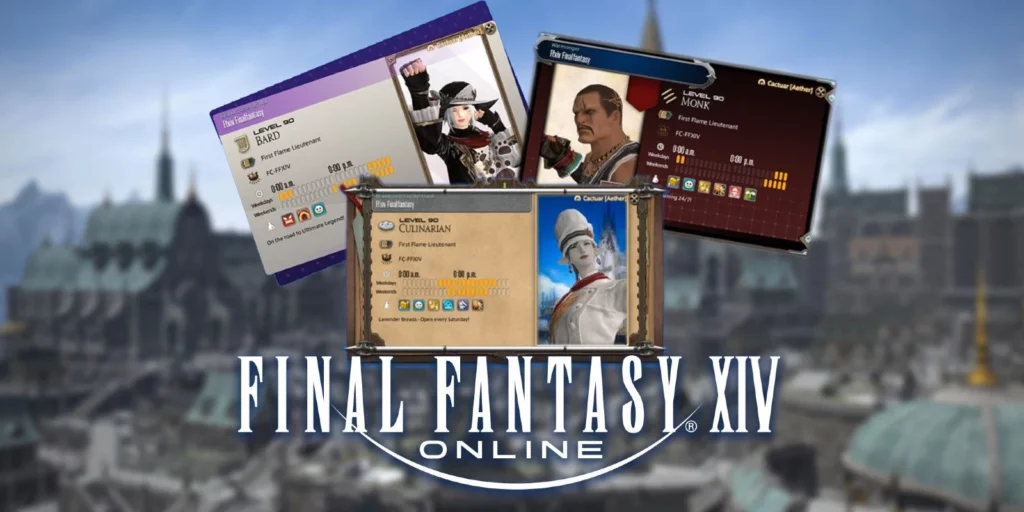
Welcome to our guide of “Final Fantasy 14: How To Make An Adventurer Plate?”. We’ll go over all there is to understand on Adventurer Plates & Portraits from Final Fantasy XIV in this guide.
Final Fantasy 14: How To Make An Adventurer Plate?

How to make an Adventurer Plate in Final Fantasy 14?

Launch your Character Menu by clicking the button in the bottom right-side corner of the window. Then choose the Adventurer Plate. This will open the Adventurer Plate with your Warrior of Light’s default portrait. Choose Edit Plate Design to change your plate’s design. From here, you can modify your Adventurer Plate’s appearance. You may edit your Adventurer Plate information by selecting Edit Profile. It lets you pick your favourite class or job, favoured title, playstyle, & active hours.

Your preferred listed Job’s level, the Grand Company Rank, server, plus search comment will be shown. Edit this data to show others gamers your normal online times and game activities. This can be used to make new friends or recruit for raid parties. If the default customization options aren’t enough, you can buy more Plate options from vendors or win them through PvP.

How to make a Portrait to an Adventurer Plate?

Portraits are changeable character photos. Pose, emotion, lighting, and more may be changed to achieve the perfect shot. Selected the option below Adventurer Plate to start producing portraits. You can adjust your character’s expression and pose in the Portraits menu.

You may also modify the lighting settings. Access the sub-menu in the Portrait & choose “Apply to Adventurer Plate”. You can also use it as an Instant Portrait during Crystalline Conflict PvP bouts. The Portrait will only appear in PvP if you are currently wearing the same gear. That is, if you begin a match as a Dragoon, the Scholar Portrait is hidden.

So, this was our guide “Final Fantasy 14: How To Make An Adventurer Plate?”. Feel free to leave a comment below!

Guide News
Share. Facebook Twitter Pinterest LinkedIn Tumblr Email
Aaron
Aaron Kohn
  • Website

Aaron writes guides and news related to the games at TheWestNews.com. Apart from his passion for writing and playing games he's exploring new places around the globe.

Related Posts

Trump Loses Appeal to Restore His Name to Kennedy Center After Federal Court Ruling

July 10, 2026

Godzilla Minus Zero Trailer Reveals Release Date, Returning Cast and Bigger Kaiju Threat

July 9, 2026

‘Moana’ Review: Disney’s Live-Action Remake Struggles to Justify Its Return to the Ocean

July 9, 2026
Advertisement

What’s Open and Closed on July 4, 2026? Banks, USPS, Stores, Stock Market and Restaurant Hours

July 3, 2026

VA Benefits July 2026: Deposit Date Confirmed for Eligible Veterans

June 30, 2026

Social Security Payment Schedule for July 2026: SSA Confirms SSI and SSDI Payment Dates

June 30, 2026

Two Social Security Payments in July 2026? Here’s Who Qualifies and Why

June 30, 2026

Godzilla Minus Zero Trailer Reveals Release Date, Returning Cast and Bigger Kaiju Threat

July 9, 2026

‘Moana’ Review: Disney’s Live-Action Remake Struggles to Justify Its Return to the Ocean

July 9, 2026

Millie Bobby Brown and David Harbour Reunite for New Netflix Spy Series

June 29, 2026

Demon Slayer: Infinity Castle Streaming Release Date May Have Been Leaked

June 29, 2026
Facebook X (Twitter) Instagram Pinterest
  • About Us
  • Contact
  • Disclaimer
  • Privacy Policy
  • Sitemap
  • Affiliate Disclosure
  • Terms
  • Careers
  • Write for Us
© 2026 TheWestNews.

Type above and press Enter to search. Press Esc to cancel.

Ad Blocker Enabled!
Ad Blocker Enabled!
Our website is made possible by displaying online advertisements to our visitors. Please support us by disabling your Ad Blocker.
✕