

Close Menu
The West News
  • Home
  • News
  • Entertainment
  • Gaming
  • Money
  • Local
    • Los Angeles
Facebook X (Twitter) Instagram
The West News
  • Home
  • News
  • Entertainment
  • Gaming
  • Money
  • Local
    • Los Angeles
Facebook X (Twitter) Instagram
The West News
Home » Pupperazzi: Changing Dog’s Outfits
News

Pupperazzi: Changing Dog’s Outfits

Aaron KohnBy Aaron KohnFebruary 8, 20222 Mins Read
Facebook Twitter Pinterest LinkedIn Tumblr Email
Pupperazzi: Changing Dog's Outfits
Share
Facebook Twitter LinkedIn Pinterest Email

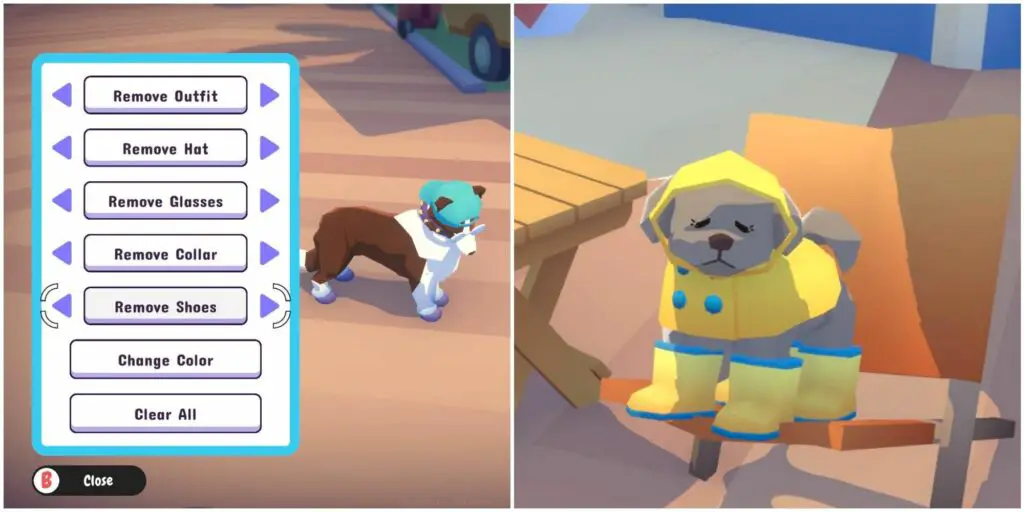
Welcome to our guide of “Pupperazzi: Changing Dog’s Outfits”. Changing your dog’s clothes in Pupperazzi isn’t only a fashion statement, it can also provide you with certain advantages. Here, you’ll find all you need to know!
Pupperazzi: Changing Dogs Outfits

Unlocking the ability to change outfits

You’ll need to gain the ability to edit a dog’s attire before you can do so. It is, however, unlocked quite early on, which is fantastic news.
You’ll be able to enter the 2nd map, Buppy Boardwalk, after finishing the 1st map, Lighthouse Cove. You’ll be given a quest to gain a full 55 followers while travelling and earning more followers on this second map. If you pass, you’ll be able to edit the apparel of dogs and style them up however you want.

Why do you have to change the outfits?

Changing a dog’s attire has a few objectives, despite the fact that it may appear to be just a lovely thing to do. Taking a picture of a dog dressed up will increase the number of Fashion followers. It will also increase the number of people who enjoy your photos when you publish those on the DogNET.
Furthermore, it’s a quick and simple way to earn the En Dogue award, which asks you to snap at least 20 photos of fashionable dogs, defined as dogs who wear multiple accessories. Many dogs are seen with a lot of clothing on but if you actually want to quicken things up, alter their attire and add the accessories yourself.

Changing the dog’s outfits

You’ll just need 55 followers to activate the ability to customize a dog’s appearance. Then, when you get close to a dog whose clothing you’d like to modify, look for a Shirt icon beside the Pet button and click it.

Explore all of your ideas,  you can modify entire clothes, hats, attach accessories, shoes, and shirts, to name a few. There are a plethora of charming options, and choosing the correct one in the right situation can result in a truly stunning image, it’s a terrific way to exercise your creativity and imagination.

We hope you liked our ‘Pupperazzi: Changing Dog’s Outfits’ guide. Please do leave a comment below.

Guide News
Share. Facebook Twitter Pinterest LinkedIn Tumblr Email
Aaron
Aaron Kohn
  • Website

Aaron writes guides and news related to the games at TheWestNews.com. Apart from his passion for writing and playing games he's exploring new places around the globe.

Related Posts

Who Is Penny Lane? British Model’s Black Swimsuit Walk At Miami Swim Week Goes Viral

June 4, 2026

Obsession’ Earns More in Third Weekend Than It Did in Its First Two Box Office Weekends

June 4, 2026

Digital Transformation Is Changing the Creative Industry

May 19, 2026
Advertisement

Best Bad Credit Loans of May 2026: Compare Rates, Lenders, And Risks

May 13, 2026

Soft2Bet Professional Growth and Work Environment

May 11, 2026

Capital One Platinum Secured Credit Card Review (2026)

May 7, 2026

Reflex® Platinum Mastercard® Review 2026: High Fees Make This Card Hard To Recommend

May 7, 2026

Who Is Penny Lane? British Model’s Black Swimsuit Walk At Miami Swim Week Goes Viral

June 4, 2026

Obsession’ Earns More in Third Weekend Than It Did in Its First Two Box Office Weekends

June 4, 2026

Avengers: Doomsday Reportedly Runs Close To Four Hours Including Post-Credit Scenes

May 1, 2026

Spider-Man: Brand New Day Reveals Opening Scene, New Suit, and Key Details

April 29, 2026
Facebook X (Twitter) Instagram Pinterest
  • About Us
  • Contact
  • Disclaimer
  • Privacy Policy
  • Sitemap
  • Affiliate Disclosure
  • Terms
  • Careers
© 2026 TheWestNews.

Type above and press Enter to search. Press Esc to cancel.

Ad Blocker Enabled!
Ad Blocker Enabled!
Our website is made possible by displaying online advertisements to our visitors. Please support us by disabling your Ad Blocker.