

Close Menu
The West News
  • Home
  • News
  • Entertainment
  • Money
  • Local
    • Los Angeles
  • World News
Facebook X (Twitter) Instagram
The West News
  • Home
  • News
  • Entertainment
  • Money
  • Local
    • Los Angeles
  • World News
Facebook X (Twitter) Instagram
The West News
Home » PS5: How To Invert Your Camera Controls?
News

PS5: How To Invert Your Camera Controls?

Aaron KohnBy Aaron KohnMay 11, 20222 Mins Read
Facebook Twitter Pinterest LinkedIn Tumblr Email
PS5: How To Invert Your Camera Controls?
Share
Facebook Twitter LinkedIn Pinterest Email

Do you know how to invert your camera controls on your PS5? Just so you know that your PS5’s invert camera options will always be necessary, as everyone has an opinion on inverted or standard controls. There’s a way to flip camera settings on the PlayStation 5 hidden inside the system menu, so keep reading to learn where to locate it and how to set it for all compatible games.
PS5: How To Invert Your Camera Controls?

How to invert your camera controls?

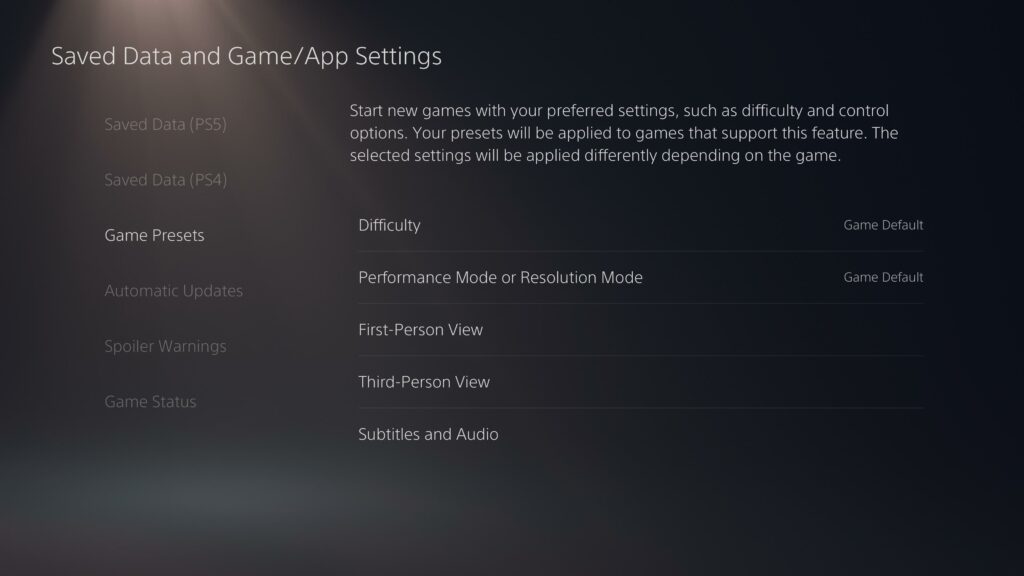
To be an inverter previously, you had to alter the view setting for every game, so if the choice wasn’t accessible, you just had to bear with it. With PS5’s invert camera settings, you may configure your view choices once and they’ll be reflected to all compatible games. Activate Game Presets in Settings > Saved Data. You may select the PS5 invert camera controls here, as well as your desired level, game-type, and subtitle settings. Choose the First-Person View or the Third-Person View for the horizontal or vertical camera motion for Normal, Game Default or Inverted setting. Because this tool isn’t available in every game, you’ll still need to alter the PS5 invert camera controls manually. This should at least speed things up and in some games like Astro’s Playroom, it’s the only option to adjust your view settings.

So, this was our guide “PS5: How To Invert Your Camera Controls?”. Feel free to leave a comment below!

We post fresh content daily and if there is something specific that you would like us to cover then please do let us know all about it in the comments section below. Your thoughts and opinions matter the most to us because they help us to serve you better. We are always looking forward to hear from you.

gaming News
Share. Facebook Twitter Pinterest LinkedIn Tumblr Email
Aaron
Aaron Kohn
  • Website

Aaron writes guides and news related to the games at TheWestNews.com. Apart from his passion for writing and playing games he's exploring new places around the globe.

Related Posts

Trump Slams Grammys and Threatens Lawsuit Over Trevor Noah Joke

February 4, 2026

GTA 6 Marketing Begins This Summer as Take-Two Reaffirms November Release

February 4, 2026

Fallout Season 2 Finale Review: The House Mostly Wins

February 4, 2026
Advertisement

I Didn’t Change My Spending I Just Started Getting Free Flights and Hotels

December 15, 2025

I Thought My Points Were Worth $600 — Then I Booked a $6,200 Flight

December 15, 2025

The 5-Step Blueprint to Booking Your First $10,000 Flight for $50

December 15, 2025

Current Marriott Bonvoy Card Offers: What You Can Earn Right Now

November 23, 2025

Trump Slams Grammys and Threatens Lawsuit Over Trevor Noah Joke

February 4, 2026

Fallout Season 2 Finale Review: The House Mostly Wins

February 4, 2026

Steal Review: Prime Video’s Twisty Heist Thriller Powered by Sophie Turner

February 4, 2026

Disney Plus Schedule November 24-30, 2025: Chris Hemsworth Documentary and Beatles Anthology Arrive

November 23, 2025
Facebook X (Twitter) Instagram Pinterest
  • About Us
  • Contact
  • Disclaimer
  • Privacy Policy
  • Sitemap
  • Affiliate Disclosure
  • Terms
© 2026 TheWestNews.

Type above and press Enter to search. Press Esc to cancel.