

Close Menu
The West News
  • Home
  • News
  • Entertainment
  • Gaming
  • Money
  • Local
    • Los Angeles
Facebook X (Twitter) Instagram
The West News
  • Home
  • News
  • Entertainment
  • Gaming
  • Money
  • Local
    • Los Angeles
Facebook X (Twitter) Instagram
The West News
Home » Dying Light 2’s Game Breaking Crash May Be Fixed
News

Dying Light 2’s Game Breaking Crash May Be Fixed

Aaron KohnBy Aaron KohnFebruary 5, 20222 Mins Read
Facebook Twitter Pinterest LinkedIn Tumblr Email
Dying Light 2's Game Breaking Crash May Be Fixed
Share
Facebook Twitter LinkedIn Pinterest Email
Dying Light 2's Game Breaking Crash May Be Fixed

Welcome to our ‘Dying Light 2’s Game Breaking Crash May Be Fixed’ article. The much-anticipated zombie game sequel Dying Light 2 has officially been released to mixed reviews – but regardless of how you feel about the game itself, some people are enraged that they can’t play it.

Yes, there is a bug that causes Dying Light 2 to crash to the desktop for certain players. Bad.

This terrible glitch may be fixed easily — at least for Steam users, according to PC Gamer.

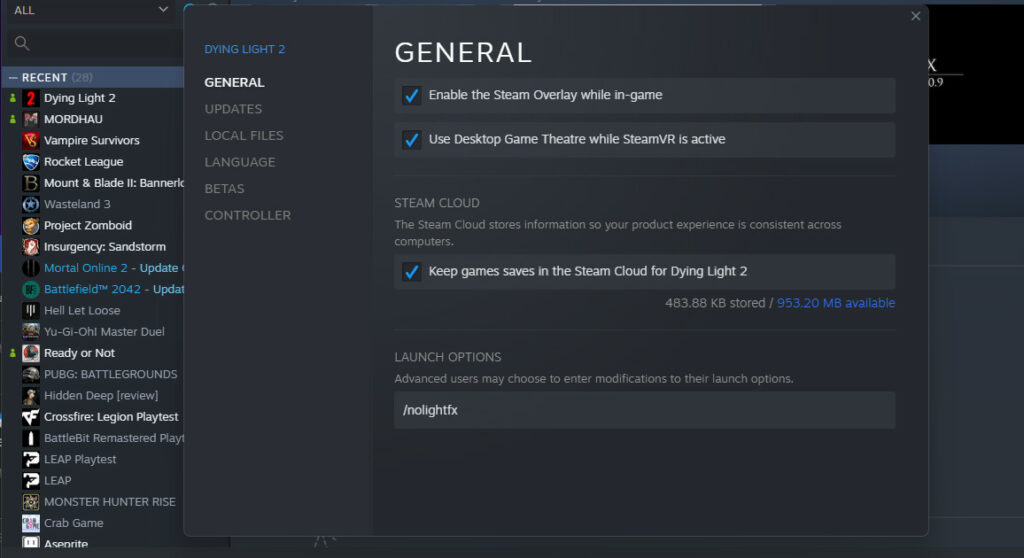
Go to your Steam library, right-click Dying Light 2, choose ‘Properties’. On the ‘General’ tab, look for the ‘Launch Options’ box at the bottom. Input the following: /nolightfx

Close the panel to save your changes. This choice will be applied the next time you start Dying Light 2, perhaps saving you from the terrible crash monster.
Dying Light 2's Game Breaking Crash May Be Fixed

Dying Light 2’s Game Breaking Crash May Be Fixed: Overview

The repair was announced over Discord by Techland’s community manager. There are mixed opinions on how well it works, but given how simple it is to attempt, you have nothing to lose by giving it a go. If it doesn’t work for you, or you don’t use Steam, you’ll have to wait for the next update (presumably). We expect hear from the developer shortly about the outcomes of its study.

A day one patch for a game as ambitious as Dying Light 2 isn’t rare – in fact, it’s anticipated.

There are obviously some bugs, but it would be a marvel if there weren’t any. Most bugs in the works are small, but not this game-breaking startup glitch. Hopefully, if you are afflicted, the following easy repair will help.

We hope you liked our article on Dying Light 2, please do leave a comment below and let us know if this was helpful.

gaming Guide
Share. Facebook Twitter Pinterest LinkedIn Tumblr Email
Aaron
Aaron Kohn
  • Website

Aaron writes guides and news related to the games at TheWestNews.com. Apart from his passion for writing and playing games he's exploring new places around the globe.

Related Posts

A Few Good Men Revival Reveals New Cast for Tom Cruise and Jack Nicholson’s Iconic Roles

June 24, 2026

Pokémon GO Necrozma Raid Guide: Best Counters, Weaknesses, CP, and Fusion Explained

June 23, 2026

Pokémon GO July 2026 Events Schedule: GO Fest, Sobble Community Day, Raids, and More

June 23, 2026
Advertisement

Best 0% APR Credit Cards of June 2026

June 14, 2026

Best Bad Credit Loans of May 2026: Compare Rates, Lenders, And Risks

May 13, 2026

Soft2Bet Professional Growth and Work Environment

May 11, 2026

Capital One Platinum Secured Credit Card Review (2026)

May 7, 2026

A Few Good Men Revival Reveals New Cast for Tom Cruise and Jack Nicholson’s Iconic Roles

June 24, 2026

Toy Story 5 Opens to Record $160 Million, Delivers Biggest Box Office Debut of 2026

June 23, 2026

Supergirl First Reactions Praise Milly Alcock and Jason Momoa, Though Some Critics Call It a Mixed Bag

June 20, 2026

Jimmy Kimmel Says World Leaders ‘Hate’ Trump After Awkward G7 Moments

June 19, 2026
Facebook X (Twitter) Instagram Pinterest
  • About Us
  • Contact
  • Disclaimer
  • Privacy Policy
  • Sitemap
  • Affiliate Disclosure
  • Terms
  • Careers
  • Write for Us
© 2026 TheWestNews.

Type above and press Enter to search. Press Esc to cancel.

Ad Blocker Enabled!
Ad Blocker Enabled!
Our website is made possible by displaying online advertisements to our visitors. Please support us by disabling your Ad Blocker.
✕